Managing Resolved Fields
Selecting a value for Validate Against enables resolving for fields defined by the user so that when the user enters data in one field, another is automatically populated. This feature has advantages both in terms of usability (less typing required from the user to fill certain forms) and in terms of data integrity (new entities store linked data, IDs and related fields, with the entity data rather than linking to them via the ID and pulling the additional related fields from the related entity table. That being the case, it is important to ensure that the right value of the related field is “resolved” upon storing the data for an entity.
Examples:
- When the end user selects the Site Code the system also displays the name of the Site automatically.
- When the end user selects the Product Code the system also displays the Name of the Product automatically.
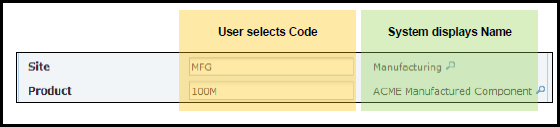
NOTE: This could also be accomplished in the workflow definition (there are several resolve functions to use) or in the form definition (dual display, etc.). The recommendation is to configure this as much as possible at the entity level, since it is really the right place to do so, as it pertains to the entity responsibility.
- Open the entity in which you want to apply child entity relations.
- Click the Resolved Fields tab.
- Click the drop down button and select the field set.
- Click the Add button.
Result: A new row is added to the bottom of the list.

- Enter the information in the following fields:
| Field | Description |
|---|---|
|
Action |
This field provides the option to delete (X) any field set. The action removes resolving if the designer does not want the field set, or if the designer made a mistake. |
|
Source |
When linking to the parent entity, this is the column that holds the value identifying the parent (link target). |
|
Target |
The target links to the previous (parent) entity. |
- From the menu at the top of the window, select Entity > Save.
Result: The changes have been confirmed.
Example:
MYSTRING100 – Validate Against – Actor
The Resolved Fields tab:
Source: RSN_NAME – Name (any field from actor table)
Target: MYSTRING120 - MYSTRING120 (any field in my entity)
The user types SMARTADMIN into MYSTRING100. When they click Submit, MYSTRING120 will automatically be populated with “ADMINISTRATOR S SYSTEM.”
The resolving is an additional configuration on top of validation since the code is first ensured to be a valid code against the linked entity/table, and then, optionally, more fields (other than code) could be set with additional fields of the linked entity/table.